Turn on Copilot in Safari on iPhone
Enable Simplify’s Safari extension on iOS and open it on a job application.
Last updated About 2 hours ago
Install the Simplify iOS app, sign in, then open Profile → Settings → Simplify Copilot for Safari and follow the setup steps. Enable the extension and its website permissions in iPhone Settings. Open a supported application in Safari to fill, review, and submit it yourself.
Enable the Safari extension
Open the Simplify iOS app and sign in. Tap the Safari setup prompt, or open Profile → Settings → Simplify Copilot for Safari.
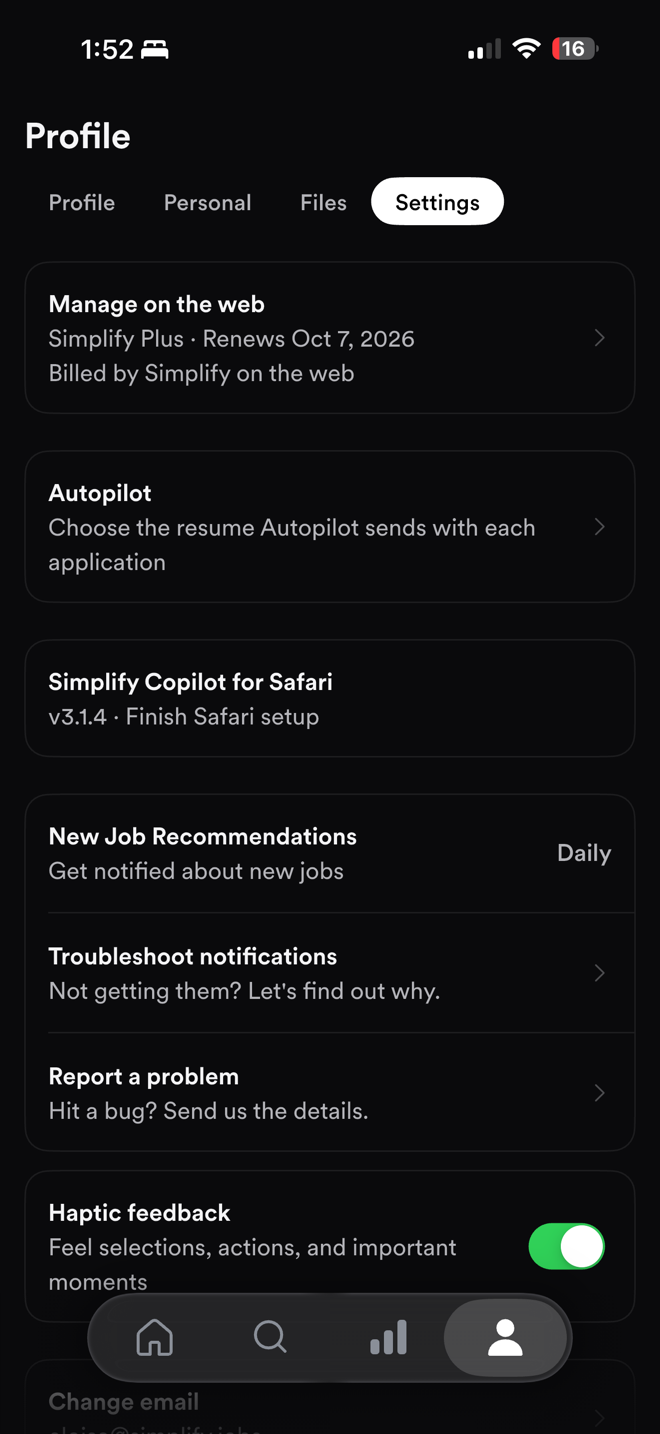
Follow the link to iPhone Settings and turn on Simplify Copilot.
When prompted for website access, choose All Websites and Allow to let Copilot work across supported application sites.
Open an employer’s application in Safari. Tap the Copilot sheet or open it from Safari’s Extensions menu, then start autofill.
Review the completed fields, answer anything remaining, and submit the application yourself.
Open Copilot manually
In Safari, open the page or extensions menu beside the address bar and choose Simplify Copilot. The exact menu placement can vary with the iOS version. Make sure you are viewing the application in Safari rather than an embedded browser inside another app.
Why website access is needed
Application forms live on many employer and applicant tracking sites. Copilot needs permission to work with the application page so it can detect fields and fill them. If permission is set to Ask or Deny, it may not appear or be able to fill that page.
For the data processed by the extension and its use, read the Privacy Policy. Website permission and support for a particular form are separate: allowing access does not make every application compatible.
If Copilot does not appear
Confirm the Simplify app is installed and signed in to the correct account.
Check that the Safari extension is enabled and website access is allowed.
Reload the actual application page and open Copilot manually from the extensions menu.
If the form is unsupported, complete it manually and request support for the page.
For a persistent app or Safari issue, use Profile → Settings → Report a problem in Simplify. Include the job site and what you tried. To review manually from a card showing Autopilot, use ↗ beside Autopilot; that opens Safari rather than starting automatic submission.
Related articles
Was this helpful?
Still need help? Share an idea