The Complete Guide to Simplify+
Simplify+ expands your AI talent agent with advanced tools for tailoring applications, networking, outreach, and job discovery.
Last updated 2 days ago
TL;DR
Resume Builder & ATS Optimization — Generate tailored resumes for specific jobs, automatically add missing keywords, improve ATS performance, get real-time resume feedback, and create unlimited resume versions for different roles and industries.
Networking & Referrals — Surface your connections at target companies, identify referral opportunities, and generate personalized outreach messages to recruiters and hiring managers.
Cover Letter Generator — Generate personalized cover letters in your preferred writing style, customized to the role you’re applying for. Save unlimited versions of cover letters for different opportunities and industries.
Job Analytics — See how many people have applied to a job, to see how competitive a job posting may be.
AI Email & Follow-Ups — Generate and send any referral requests or application follow-up emails directly from your Job Tracker using information already connected to the role.
Understand how closely you match the role
Once you identify a role you want to pursue, the next step is understanding how closely your current application aligns with what the employer is looking for.
Simplify compares your resume against the job description and surfaces a Keywords Score along with any missing skills, qualifications, tools, or technologies that may not be represented clearly enough.
As a general guideline, we recommend aiming for around 70% keyword coverage before applying.
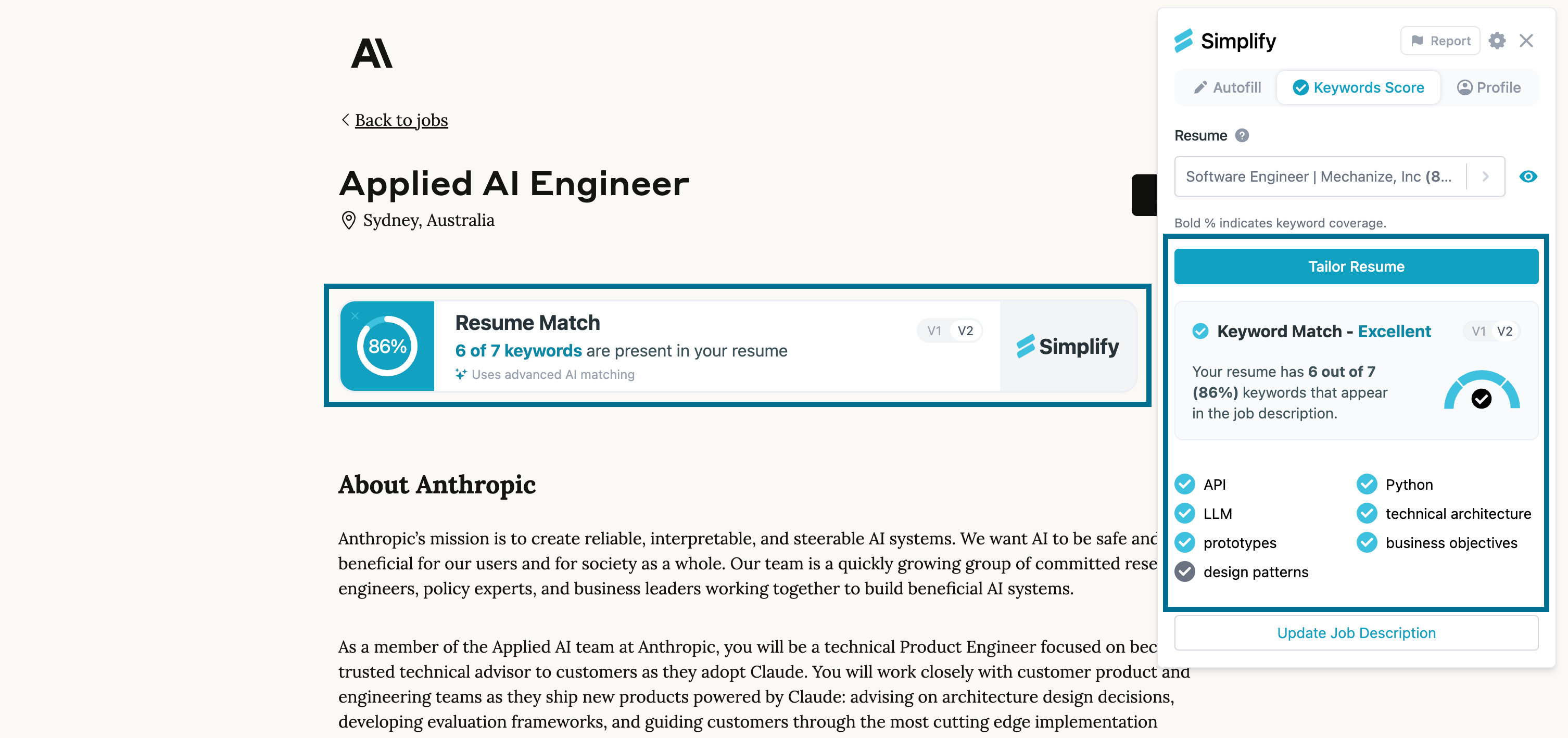
The score helps you understand whether your experience is being communicated clearly for that specific role and whether your application reflects the qualifications the employer is actively prioritizing.
Better alignment does not guarantee interviews, but it can improve how well your application matches the profile of candidates the company is looking to hire.
Tailor your application materials
Once you understand the gap between your current resume and the job description, Simplify+ can help you tailor your application materials around that specific opportunity.
Resume tailoring
Simplify’s Resume Builder can generate a tailored version of your resume using:
your Simplify Profile
information parsed from an uploaded resume into your Simplify profile
a resume you have already built in Simplify
the target job description
Simplify+ can rewrite bullet points, incorporate missing keywords, adjust how skills and experience are emphasized, and generate unlimited role-specific resume versions without changing your original resume.
You can also chat with Simplify’s AI tools to brainstorm how to position your experience, improve wording, strengthen individual bullet points, and better align your background with the role.
Alongside tailoring, Simplify+ includes:
ATS optimization tools & scoring feedback
AI resume feedback
keyword recommendations
resume scoring insights
These tools help ensure your resume is both tailored to the role and structured in a way that performs well in applicant tracking systems.
To learn more about tailoring and building your resume on Simplify: Building and Tailoring your Resume on Simplify
💡 Tip: You can use our ‘Fit to Page’ button to ensure your tailored resume is always one-page long.
Cover letter generation
The same workflow applies to cover letters.
You can:
start from a previous cover letter
use a saved template
upload an existing cover letter
generate a new version using the job description and company as context
Each version remains editable, so you can review and refine the final draft before using it.
For more information on tailoring and generating cover letters: Tailoring a Cover Letter to a Job Application
Application questions
Many applications include open-ended questions that go beyond standard autofill.
Questions like:
“Why are you interested in this company?”
“Why are you a good fit for this role?”
“What are you looking for in your next position?”
can be generated using your profile, resume, and the target job description as context.
Responses to repeated questions can also be saved and reused later when similar prompts appear in future applications.
Read more on how Simplify+ can handle unique application questions: Answering Essay Questions with Copilot
📝 Note: In Resume Builder and Copilot, you can review and edit generated resumes, cover letters, and responses before submitting. Autopilot prepares and submits applications without a review step.
Find referrals and introductions through your network
For opportunities you care deeply about, referrals and warm introductions can often be just as important as the application itself.
With your LinkedIn network connected, Simplify can show connections at target companies while you browse jobs. Look for Get referrals on a supported job in Job Matches or the Job Board.
This can help you:
identify referral opportunities
request introductions
connect with employees at a company
learn more about a role before applying
follow up with people after submitting an application
Networking can be useful both before and after applying. Sometimes it helps you learn more about a role before investing time into an application. Other times it helps create additional visibility after your application has already been submitted.
For more on Networking: Networking on Simplify+
Submit the application with Copilot
Once your materials are ready, Copilot can help complete the application itself.
Copilot uses your profile, tailored resume, cover letter, and saved responses to autofill supported applications directly on hiring sites.
Because the same profile powers your entire workflow, you can repeat this process across many applications without repeatedly entering the same information. This makes it easier to maintain application quality while still applying consistently across a larger number of opportunities.
Or let Autopilot submit it. If you'd rather not sit through the application at all, choose Autopilot from the dropdown next to Apply and it completes and submits the application for you. Simplify+ includes 20 auto-applies a week.
Getting started with Autopilot
Track and manage applications on Simplify
After submitting an application, the role can be automatically added to your Job Tracker on Simplify.
Your application history, documents, statuses, outreach activity, and follow-up workflows stay connected to the same opportunity, making it easier to manage your search as applications progress through interviews, offers, and decisions.
Instead of managing spreadsheets, separate documents, and scattered notes, the Job Tracker keeps everything connected around the applications you are actively pursuing.
To see more on how to use it: Using the Job Tracker
Generate and send outreach emails
Many applications do not end after submission.
Simplify+ includes AI Email inside the Job Tracker, which can generate:
recruiter outreach
application follow-ups
interview thank-you notes
referral requests
offer-stage communication
using the information already connected to the role.
If you connect your Gmail account, you can generate, review, and send those emails directly from Simplify.
When you open an application in the Job Tracker, AI Email already has access to the job description, company information, role details, and your application history. That context helps generate more relevant drafts without requiring you to repeatedly explain who you are, what role you applied for, or why you are reaching out.
For more on using AI Email: Using AI Email
Additional Simplify+ features that support your search
While the workflow above focuses on individual applications, several Simplify+ features continue working in the background across your broader job search.
Companies You’re Connected With
This feature surfaces companies where you already have existing connections, helping identify opportunities where referrals may already be available.
Recruiter Visibility
Simplify+ keeps your profile visible to recruiters without requiring a visibility streak.
Recruiters can only discover you if Show Profile to Recruiters is enabled, and you remain in control of that setting at all times. For more information on setting your profile preferences: Editing your Profile after Onboarding
Job Analytics
Additional job analytics help provide context around application activity and competition across opportunities on the platform, making it easier to prioritize where to focus your efforts.
For example, if you come across a highly sought-after internship at a company like Google, and the posting has only been viewed a small number of times so far, that may indicate you are seeing it relatively early. In situations like that, spending extra time tailoring your resume, cover letter, and application materials can be worthwhile because there is a greater chance your application will be reviewed before competition increases.
💡 Tip: If you discover a job outside Simplify, it is often worth searching for it on the platform first. If the role exists in our database, you can view the same analytics and continue the rest of your application workflow from there.
What to do next
If you are new to Simplify+, a good place to start is:
Review your Job Matches and Job Board recommendations
Check the analytics and Keywords Score for a role you are interested in
Generate a tailored resume and cover letter, using the Documents tab
Apply using Copilot
Track the opportunity in the Job Tracker
Follow up through AI Email or Networking
The more context you add to your profile, resumes, and preferences, the more useful the rest of Simplify+ becomes. Because the same profile powers recommendations, tailoring, applications, networking, and recruiter visibility, the work you do in one part of Simplify carries across the rest of your search.
Was this helpful?
Still need help? Share an idea