Understand Resume Score and keyword matching
Learn how Resume Score differs from keyword coverage and how to use the feedback.
Last updated About 2 hours ago
Resume Score combines job-specific keyword matching with checks of your resume’s content, structure, and formatting when those checks are available. Keyword Match shows which terms from a job description appear in your resume. Both are Simplify feedback, not an employer’s ATS score or a prediction of an interview.
Resume Score and Keyword Match measure different things
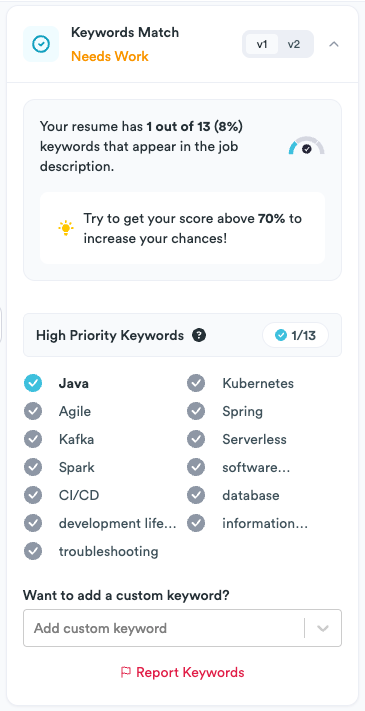
You may see older labels such as Keywords Score or Resume Match in Copilot and in the screenshots. Read the label and the breakdown beside the number. A keyword percentage and the broader Resume Score can differ even for the same resume and job.
The screenshot below illustrates the keyword breakdown, including high-priority terms and missing keywords. It does not show every component of the broader Resume Score.
What contributes to Resume Score?
When a target job is available, Simplify compares terms from its description with the resume you selected. The broader score also checks the structured resume for issues such as missing contact information or sections, too little content, very short bullets, inconsistent punctuation, and sections without visible content.
Keyword relevance has more weight than the content component when both are present. The combined score is not a simple average, so improving keyword coverage by ten percentage points does not necessarily add ten points to Resume Score.
If there are no job keywords to compare, the score can reflect the content checks alone. If an uploaded file does not yet have the structured content needed for those checks, the score can fall back to keyword coverage. The available breakdown explains what Simplify was able to evaluate.
Check a resume against the right job
Select the resume you plan to use. Different saved versions can produce different results.
In Resume Builder, set the Target Job from Job Tracker or enter its title and description. In Copilot, check the job description it detected.
Read the matched and missing keywords, then review the content issues listed in Resume Builder.
Edit the relevant experience or sections and wait for the saved resume to be recalculated.
Use the feedback without chasing a number
Start with missing terms that describe experience you actually have. For example, if a posting calls a tool “PostgreSQL” and your resume only says “database work,” naming the tool in the relevant project can make the description more specific. Do not add skills or accomplishments you cannot support.
Address missing information and unclear bullets as well as keywords. Simplify+ can suggest rewrites, but review the changes before applying them. The same resume can have different keyword coverage for different jobs because each posting asks for different things.
Some older screenshots show a 70% keyword suggestion. This is not an employer’s passing threshold or a requirement to export or apply. There is no universal score that guarantees an interview or tells you how a particular employer will screen your application.
If the score is missing or looks wrong
Check the selected resume and job description, wait for saving and recalculation to finish, and check that the resume contains readable text. If the keyword extraction is wrong, report it from the keyword panel or Copilot’s Report control. An error calculating a score is not a judgment about your qualifications.
Related articles
Was this helpful?
Still need help? Share an idea