Building and Tailoring your Resume on Simplify
Build and tailor resume versions around a target job, improve keyword and ATS alignment, and keep everything synced to your Simplify profile.
Last updated 2 months ago
TL;DR
Simplify allows you to create and manage different resume versions tailored for different jobs.
Resume Builder helps compare your resume against a target job description and improve keyword alignment.
Using new resumes update changes back into your Simplify profile
Simplify's Resume Builder is designed around how people actually apply to jobs.
Different roles often emphasize different experiences, skills, and keywords, even within the same field. Resume Builder helps you tailor your resume toward a specific role while keeping each version organized inside Simplify.
If you uploaded a resume during onboarding, your profile becomes your starting point. Your Simplify Profile information fills the resume automatically, so you can focus on refining and tailoring instead of rebuilding everything manually.
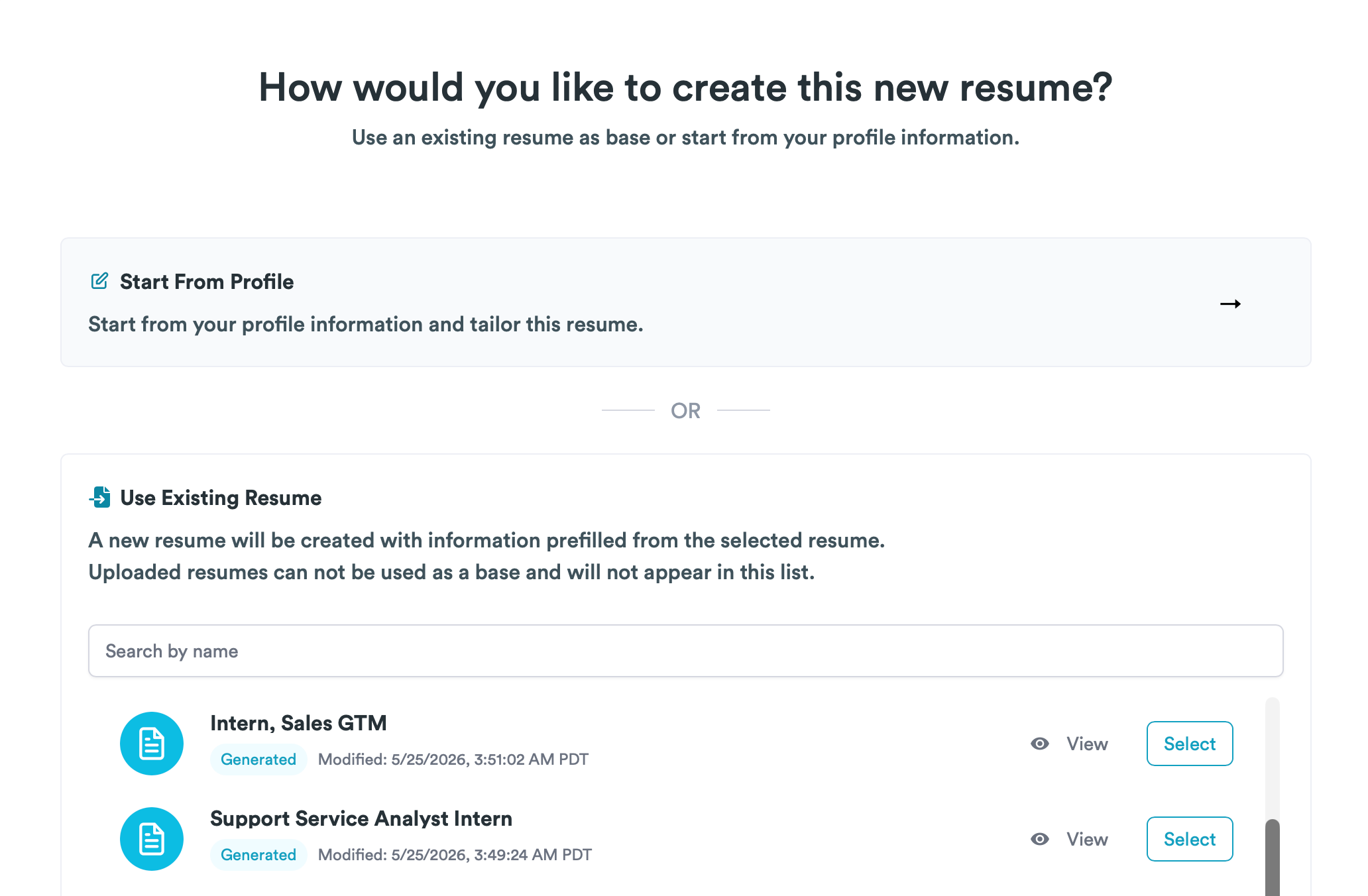
Tailoring resumes around a target job
Resume Builder works best when it has a job description to tailor against.
Inside the builder, you can connect a target job from your Job Tracker or paste a job title and description manually. Once a target job is set, Simplify compares your current resume against the language and requirements in that posting.
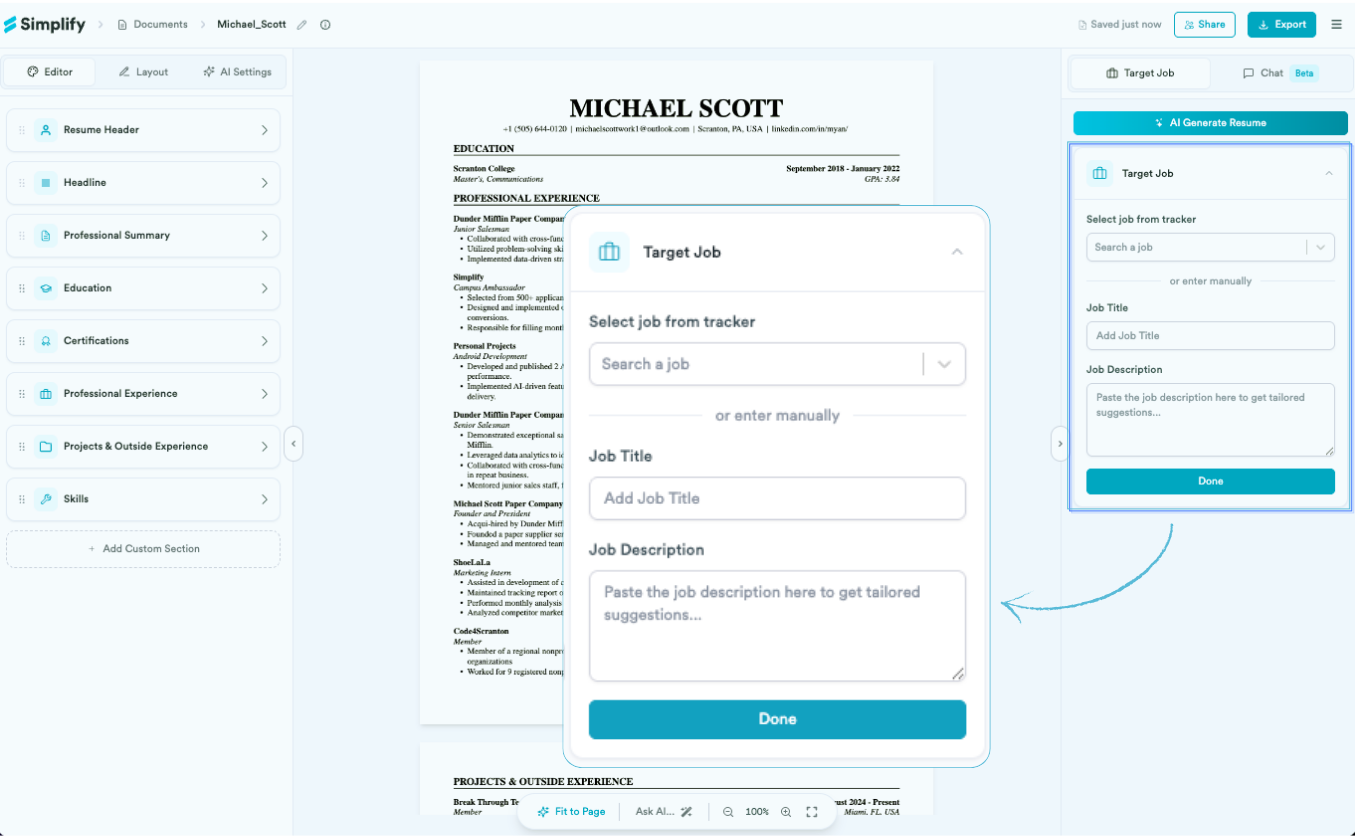
Different companies often describe similar roles in different ways. Resume Builder helps you see how your current resume aligns with the specific posting you're applying to, so you can adjust wording, emphasis, or skills coverage where it matters.
Understanding Keyword Match
The Keyword Match panel shows how closely your resume aligns with the target job description.
You'll see:
an overall match score
keywords your resume already covers
keywords that are missing or underrepresented
This helps surface the parts of the job description that the company appears to care about most.
🎯 Tip: A higher match score means your resume reflects more of the language and skills mentioned in the posting. Simplify recommends aiming for at least 70% keyword coverage before applying, though you can still export or apply with any score.
The missing keywords list is usually the most useful part of the panel. It gives you a clearer sense of what experiences, tools, or skills the role is emphasizing so you can decide what adjustments are worth making.
Using the Simplify Resume Score and ATS Checker
Resume Builder also includes a Simplify Resume Score to help you understand how your resume may perform in an ATS screening process.
As you edit your resume, Simplify's ATS checker analyzes things like keyword coverage, formatting, structure, and missing sections, then gives you a score out of 100 along with suggestions for improvement.
The feedback is meant to help you spot weak points while you're still tailoring, rather than after you've already applied. You can also see which parts of your resume are helping your ATS score and which areas may need stronger alignment with the target role.
Editing and versioning your resume
Resume Builder is designed around iteration and versioning.
You can tailor one version of your resume for backend roles, another for product-focused applications, and another for a specific company without overwriting your original version.
The editor lets you:
rewrite or reorder bullets
add or remove content
hide bullets from a specific version
adjust skills and project emphasis
reorganize sections depending on the role
As you edit, the Keyword Match panel updates alongside your changes so you can see how the resume evolves against the target job.
Company names, titles, and employment dates come from your Simplify Profile rather than living independently inside each resume. This keeps important experience details consistent across versions while still letting each resume have different bullets, emphasis, and tailoring.
If you make improvements while tailoring a resume, Simplify+ can also detect the differences between your tailored version and your original profile-based resume and let you apply those updates back to your profile. That helps useful edits carry across future resumes instead of staying isolated to a single version.
For more on how your documents connect across Simplify, see Managing your Documents
AI tailoring tools (Simplify+)
Simplify+ adds AI tools directly inside Resume Builder.
These tools can:
rewrite an entire resume against a target job
regenerate bullets individually
rewrite all bullets inside a section
pull missing keywords into existing experience
give feedback through the Chat panel
The AI tools are designed to reduce repetitive editing work, especially when you're tailoring resumes across multiple applications with similar requirements.
You can also adjust how aggressively the AI tailors your resume through AI Settings, including:
keyword emphasis
metrics emphasis
title alignment with the target role
✨ For example: If you're applying to a senior role, you might turn up title alignment and metrics emphasis so your resume leans into leadership scope and quantified impact.
For more on Simplify+ resume features, see What's Included in Simplify+.
Layout and formatting
The Layout tab controls the visual structure of the resume:
templates
typography
section arrangement
column layouts
Changing the layout does not remove or rewrite your content. It only changes presentation.
📝 Note: If a resume runs longer than one page, Fit to Page automatically compresses spacing and formatting to keep the resume within a single page.
Contact information formatting
Resume Builder also lets you control how certain contact details appear on your exported resume.
From the Editor tab, you can customize options such as:
Show Phone Country Code — Display or hide your international dialing code (for example,
+1) before your phone number.Show Full URLs — Choose whether to display full website addresses or shorter, cleaner links for your LinkedIn, GitHub, portfolio, and other URLs.
From the Layout tab, you can toggle things like:
Show Country in Locations — Include or hide the country alongside city and state in your experience entries.
Experience Location Above Dates — Choose whether locations appear above or alongside employment dates.
These settings only change how your resume is presented. Your profile information stays the same, and you can update these preferences at any time.
Exporting and reusing tailored versions
Each resume in Simplify can have its own target job and its own edits.
Over time, many users build several resume variations for different role types, industries, or companies instead of relying on one master version for every application.
When you finish tailoring, you can:
export the resume as PDF or .docx
generate a shareable link
return to Documents and create another version for a different role
Over time, Resume Builder becomes a practical way to maintain organized, reusable resume versions while keeping your tailoring work connected to the rest of your job search in Simplify.
Was this helpful?
Still need help? Share an idea